
Topic Menu
Sometimes, people get more unemployment benefits than the Michigan Unemployment Insurance Agency (UIA) thinks they should have gotten. This is called an overpayment. If the UIA thinks it overpaid someone, it tries to get the money back. Read this article to learn whether you have been overpaid and what you can do about it.
How do I know if the UIA thinks I owe money?
The UIA mails collection notices (Form 1088) to people it thinks it overpaid. These letters say how much money you owe and give instructions on how to pay.
The UIA may not have your current address. To find out if you were overpaid, you can call the UIA at 1-866-500-0017 or check your MiWAM account online:
- Log into your MiWAM account at www.michigan.gov/uia;
- Go to the “View All Claims” page; and
- Click on each Claim ID number and look for amount owed in each claim.
What can I do if the UIA says I owe money?
If the UIA decides that it overpaid you, it may be able to collect money from you, even if you haven’t done anything wrong.
Overpayments happen for many reasons, including when the UIA makes a mistake. Sometimes, the UIA thinks it overpaid you even when it didn’t.
You have options if the UIA says you owe them money.
Request a Waiver
Even if you got benefits you weren’t supposed to get, the UIA must waive (or give up) collecting from you if you get a waiver. Getting a waiver means that even though the UIA thinks you owe money, they cannot collect it from you.
There are three situations where you can ask for a waiver:
Financial Hardship:
If you can’t afford to repay the overpayment, you can ask the UIA to waive it. The UIA will look at your financial situation from the last six months to decide if you qualify.
UIA Error:
If you think you were overpaid because the UIA made a mistake, you can ask that your overpayment collection be waived because of an administrative or clerical error. Some examples of possible errors that the UIA may have made include:
- The UIA paid you benefits you were not supposed to get even though you answered all the questions and submitted all the information they asked for.
- You have already appealed and won, but the UIA is still collecting from you.
- You were told to repay because you only worked part time during the COVID-19 pandemic.
- You filed a protest or appeal before January 25, 2022, and the UIA told you that you were too late.
Incorrect Wage Information:
You may be able to get a waiver if you were paid more than you should have been because the UIA had incorrect or incomplete information about your wages.
Generally, this happens when you accidentally gave inaccurate or incomplete information about your past wages to the UIA when you applied for benefits, and your employer either didn’t provide any information or also gave incorrect or incomplete information.
How to Apply for a Waiver
If you think that you should get a waiver for one or more of these three reasons, you can send a form asking the UIA to waive your overpayment of unemployment benefits.
Click here to download a Waiver Request form.
Click here to download the Waiver Request Instructions.
Click here to download an Example Waiver Request.
There are two sets of instructions below:
- The first set is for if you are applying for an administrative or incorrect wage information waiver. Use these instructions even if you are also applying for a financial hardship waiver.
- The second set is for if you are just applying for a financial hardship waiver.
Choose the set that applies to your situation.
Instructions for Applying for Any Waiver
Check Boxes on Waiver Request Form
On the Waiver Request form, check the boxes that apply to you. You can check more than one if you think more than one situation applies to you.
Fill out Question 1 of Form 1795
After you have checked the boxes on the Waiver Request form, fill out Question 1 (your name, Social Security Number, address, and phone number) on the attached UIA Form 1795 (“REQUEST TO WAIVE REPAYMENT OF BENEFIT OVERPAYMENT BALANCE”).
This information is to make sure the UIA knows who is applying for the waiver.
You need to fill out this section if you are going to apply for any of the waivers.
If you are Applying for a Financial Hardship Waiver (otherwise, skip to Step 4)
If you checked the box for “Financial Hardship”, you need to fill out all of the sections on the UIA Form 1795.
Read the questions carefully and answer accurately and completely as best as you can.
Make sure to write “N/A” or draw a line through any item that does not apply to you.
You can either print out the form and sign it, or you can type “/s/” followed by your name on the signature line to make an e-signature (example: /s/ Christie Claimant).
You do not need to attach bank records or other financial documents.
Filling out the “Net Income” section of the form can be confusing. You will need to report your income for each of the six months before your application.
- For each month, add up all your income and put it next to the dollar sign in Column A (“Yourself”).
- Write where that income came from (such as wages, scholarships, social security benefits, etc.) on the other side of the slash.
- Then, add up all your dependents’ income and put it next to the dollar sign in Column B (“Dependents”).
- Write where that income came from (such as wages, scholarships, social security benefits, etc.) on the other side of the slash.
- Add up all the wages in Column A and put the total in the “Totals” row at the bottom of the chart.
- Then, add up all the wages in Column B and put the total in the “Totals” row at the bottom of the chart.
- Add the two totals and then divide them by six to get the Average Monthly Income.
EXAMPLE:
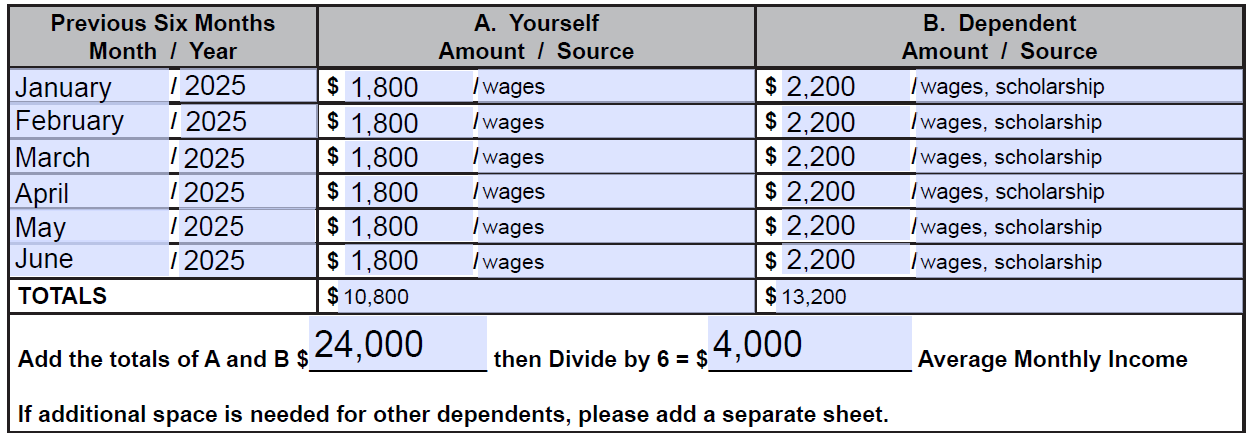
For example, Christie Claimant is applying for a financial hardship waiver on July 1, 2025. In the column labeled “Previous Six Months”, she would write “January / 2025” in the first row, “February / 2025” in the second row, and so on. In the last row, she would write “June / 2025” because she applied on July 1.
Christie works two part-time jobs. At one of her jobs, she makes $800 each month. At her other job, she makes $1000 each month. She has no other sources of income. For each month, she would write $1800 on the left side of the slash in Column A (“Yourself”), and she would write “wages” on the right side of the slash.
Christie has two dependent children. One is a college student. He has a part time job where he makes $700 each month. He also gets $1000 each month in scholarship money. Christie’s other child has a part time job where she makes $500 each month. For each month, Christie would write $2200 on the left side of the slash in Column B (“Dependent”), and she would write “wages, scholarship” on the right side of the slash.
Christie would add up all the numbers in Column A (“Yourself”): 1800 + 1800 + 1800 + 1800 +1800 + 1800 = 10,800. She would write $10,800 in the “Totals” row at the bottom of Column A.
Christie would add up all the numbers in Column B (“Dependents”): 2200 + 2200 +2200 +2200 + 2200 + 2200 = 13,200. She would write $13,200 in the “Totals” row at the bottom of Column B.
Christie would add the two totals: 10,800 + 13,200 = 24,000.
Christie would divide 24,000 by six to get an Average Monthly Income of $4,000.
Submit the Form
To make sure the UIA gets the form, you can submit it by doing both of the following:
Fax:
Use a fax machine to send all pages of the form to the UIA at 1-517-636-0427.
Be sure to get a confirmation page to show that the fax was received by the UIA and keep it for your records.
Mail:
Use certified mail to send all pages of the form to the Unemployment Insurance Agency, P.O. Box 169, Grand Rapids, MI 49501-0169
Save your proof of mailing for your records.
If you can’t mail it certified, it is a good idea to put down on a piece of paper the date, and when and where you mailed the form. Be sure to keep that piece of paper for your records.
Check the Status
Check your MiWAM account regularly and monitor your mail for any letters from the UIA about your waiver application.
Instructions for Applying for a Financial Hardship Waiver ONLY
Log into Your MiWAM Account
Log into your MiWAM account online at www.michigan.gov/uia
Click on the Waiver Request Link
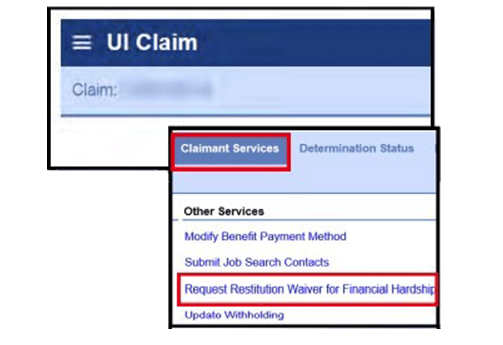
Click on the “Request Restitution Waiver for Financial Hardship” link under “Claimant Services”.
Answer the Questions
Read the questions carefully. Answer them accurately and completely as best as you can, then submit your answers.
Check the Status
Check your MiWAM account regularly and monitor your mail for any letters from the UIA about your waiver application.
You can apply for a waiver at any time.
It is common for waiver requests to be rejected. If the UIA rejects your waiver request, you will have a chance to protest their decision later. To learn more about appeals, use the Guide to Legal Help to get connected to other legal resources.
Protest
If the UIA decides that it overpaid you, it sends you a formal decision in writing. This is called a “Determination”. If you disagree with the Determination, you can protest it.
The UIA must get your protest within 30 days from the date on the Determination, or one year from the date on the Determination if you have a good reason for being late. Some examples of good reasons for being late include:
- You did not get a notice of a decision.
- The Determination arrived late in the mail, and you could not respond sooner.
- You weren’t able to act earlier.
- You were misled by incorrect information from the UIA.
If you never got a Determination in the mail, it is not too late to protest now. In your protest, you can tell the UIA that you never got the Determination and saw it for the first time when you logged into MiWAM to see if the UIA wanted money from you.
If you never got a Determination or if you filed a timely protest and never got a response, you can file a protest now and then consult with a qualified UI advocate. To get connected to resources, use MLH’s Guide to Legal Help.
The easiest way to file a protest is online through your MiWAM account. Once you have logged in to your account:
- Go the “View All Claims” page;
- Click on the Claim ID number for each claim;
- Click on the “Determination Status” tab;
- Click on “File a Protest” next to the Determination you want to protest; and
- Fill out and submit the protest form.
You can also file a protest by mail or fax using the “Protest of a Determination” page of a UIA 1733 form. The Determination notice has instructions on where to send it.
In your protest, it is important to state that you disagree with the Determination. You can say why you disagree, but it isn’t required.
If you are protesting later than 30 days from the date of the Determination, you must also explain why there is a good reason for being late.
If you have supporting evidence, like a doctor’s note or proof of earnings, include them with the protest. If you don’t have supporting evidence, you can make the protest without them. If you find supporting documents later on, you can add them.
Pay or Set Up a Payment Plan
The collection notice you get will have instructions on how to pay. If you have questions, you can contact the Benefit Overpayment Collection Unit at 1-866-500-0017 or schedule an appointment online.
If you can’t afford to pay all at once, you can ask the UIA for a payment plan.
What if I do nothing?
If you don’t repay or take any other action to address an overpayment, the UIA can:
- Take your federal and/or Michigan income tax refund.
- Garnish (take money from) your wages.
- Garnish (take money from) your bank account.
- Take other actions as listed in the collections letter (Form 1088).
Unlike most other kinds of debt, the UIA can do these things without going to court.
How do I find a lawyer to help with unemployment issues?
Dealing with the UIA can be complicated, so it can be a good idea to get legal advice if you can. You can use the Guide to Legal Help to get contact information for legal services and lawyers near you. If you qualify for free legal aid, the Guide will give you contact information for your local office.